UX/UI Trends: That Will Change The Shape of Digital Experience

We are moving into products that adapt, predict and react with real context. Designing only interfaces is not enough anymore. We are designing experiences that understand the user.
Designers and digital agencies are now challenged to move beyond traditional screens, layouts and patter. The focus is now on designing adaptable system that understand users, anticipate their needs and respond with empathy and precision.
1. Contest aware design adapting real time: Personalization experience
Spotify — “Mood and Moments”
Spotify has been experimenting with context awareness through its “Mood and Moments” playlists, which adapt to time of day, activity and even weather.
Netflix — “Personalized Movie Rows & Artwork”
Netflix analyzes:
Viewing history
Time of day
Device type
User mood inferred from behavior
Then it personalizes:
Homepage rows (e.g., “Because You Watched…”)
Thumbnail artwork (romantic scenes vs. action scenes depending on your taste)
Autoplay preview recommendations
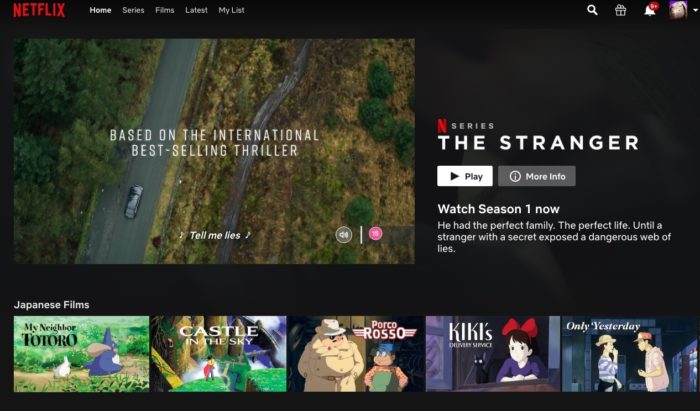
Netflix dynamically changes the entire interface based on your behavior, making each user’s home screen unique
TikTok — “For You Page (FYP)”
The FYP is generated from:
Micro-interactions (watch time per second)
Replays
Likes, comments, follows
Geo-location
Device type
TikTok builds a highly individualized stream within minutes—no two users have the same FYP.
2. Generative UX: Co Designing with AI
AI has long influenced UX, but generative UX takes the partnership between designers and machines to a new level. Instead of manually creating layouts, AI tools can now generate design variations instantly based on user goals, accessibility standards, or brand guidelines.
Figma’s AI
Figma’s AI tools and other emerging platforms are already generating interface layouts from text prompts. A designer types prompts and the system instantly produces mockups.
Adobe Firefly for UI Components
Adobe Firefly can generate UI elements such as buttons, cards, or full compositions from natural language prompts. Designers can refine the output with styles, themes, or accessibility constraints.
Framer AI – Instant Website Generation
Framer AI can generate full websites—including sections, layout, illustrations, and typography—using only a short prompt. Designers can then fine-tune everything visually.

3. Conversational AI integration: Humanizing Digital Dialogue
The line between human and machine communication continues to blur. In 2026 conversational AI will evolve from a support feature into a centric UX element allowing natural dialogue as part of navigation, search & action.
Duolingo’s AI
Duolingo’s AI Tutor already personalizes lessons through conversation, adjusting its prompts based on user confidence. We’ll see this technology embedded across interface.
Meta AI (Instagram / WhatsApp / Messenger) — Contextual Conversational Assistant
Meta’s AI now interacts directly inside chats:
Understands context of conversation
Suggests replies, image creation, or information
Adjusts tone and detail based on user messages
It turns messaging apps into two-way assistants that feel “human-aware.”
Snapchat MyAI — Real-Time Conversational Layer
Snap integrates AI inside the chat interface:
Users ask for ideas, lenses, info
AI replies in conversational tone
Suggests Snap-specific content

It blends social UX with conversational intelligence in a seamless way.
4. 3D and Depth interfaces: Designing with dimension
As hardware and rendering capabilities advance, 3D design is entering a new phase of maturity. In 2026 3D and depth interface will become a mainstream components of digital experience. Not only for visual flair, but for clarity and engagement.
Apple’s Vision Pro
Apple’s Vision Pro interface demonstrates how digital elements can float in space and react naturally to user focus or gestures. Similar depth based systems will appear on everyday platforms.
Meta Quest 3 — Spatial UI & Mixed-Reality Panels
Meta Quest OS uses:
Floating interface panels
Depth-aware windows
Hand-tracking controls
Pass-through mixed reality Panels expand or shrink depending on your proximity and focus.
It delivers consumer-level spatial computing where apps “exist in your room.”
Google Maps AR — Real-World Depth Guidance
Live View AR displays:
3D arrows aligned with real-world buildings
Depth-aware navigation
Direction changes based on your phone’s orientation
A depth-aware interface layered over reality, reacting to movement + direction.
KEA Place / IKEA Kreativ — True-to-Scale Depth Placement
KEA uses:
Room scanning
Depth detection
Spatial anchors
True-to-scale 3D furniture placement Furniture appears as if it physically exists in your room. Real-world depth + digital precision = seamless spatial UX.

5. Liquid Motion Design: the Art of Fluid Interaction
Motion has always played a vital role in UX, but the trend toward liquid motion design in 2026 pushes it to new creative heights. This approach focuses on seamless fluid transitions that make interaction feel organic and responsive. Instead of abrupt screen changes, buttons morph smoothly into menu, content cards glide softy as user scroll. These transitions make a digital experiences feel alive, reducing friction and increasing emotional engagement.
Apple Music
In Apple Music, the mini player at the bottom smoothly expands into the full-screen player. The album artwork scales up, text and control flow into position and the background color often softly adapts to the album art.
Spotify Mobile App — Fluid Player Expansion
When tapping the mini-player:
Album art smoothly scales upward
Controls glide into view
Background blends into a color gradient from the track’s artwork
Navigation bar melts away instead of abruptly disappearing
Elegant, liquid-like motion that feels “continuous.”
iOS Weather App — Animated, Fluid State Changes
Switching cities:
Weather panels slide and blend
Background animations transition with soft gradients
Temperature and icons flow into place

Feels like water-like motion rather than traditional UI movement.
Conclusion
The style of UX/UI design is evolving as a result of the rapid development of technology. The new definition of UX/UI design is that we are no longer creating static page layouts; we are creating an ever-evolving and adaptable experience. Products must do much more than show the correct information; they must not only see context but also predict what the user will need and respond appropriately.
There is also a more significant paradigm shift in the value of design today. The only way to create value through design is to move away from passive users and into a world of dynamic individuals. Ultimately, the next evolution in the design of user experience/user interfaces will be characterized by intelligent systems that adapt and predict user behavior. Some examples of this would be interfaces that change depending on user mood or website usage patterns and systems that guide users toward the desired outcome.
In the words of John Maeda, “Design creates value faster than it creates cost.” As we enter this next era of user experience design, designers and design agencies must adapt by embracing fluid interaction with users, intelligent emergent systems, and the ability to be empathetic toward a user’s experience. We need to build systems that do more than simply respond in a predictable fashion; we need to build systems that interpret and anticipate user intent. As Don Norman says, “It’s about creating designs and experiences that are not only useful and usable, but are meaningful and dignified."
References
Img sources: https://www.ikea.com, https://ios.gadgethacks.com, https://www.netflix.com,
https://www.snapchat.com/, https://medium.com
🙏 Thanks for reading the post, you are welcome to comment & leave feedback 🙂🙂🙂
About the author
Product designer - Solving the right problems, beautifully. 🇳🇵🙂🎨
Comments
Join the discussionNo comments yet. Be the first to comment.


